Aggregate VSI per cell
Here, we will demonstrate the workflow how to aggregate the VSI information for a cell from all its associated pixels in the ovrlpy analysis using a Xenium dataset, but conceptually this works the same for other imaging-based SRT platforms, as well.
from pathlib import Path

import matplotlib
import matplotlib.pyplot as plt
import polars as pl
import seaborn as sns

import ovrlpy

matplotlib.rc("font", size=6)

data_folder = Path("path/to/data")
We start by reading the transcript data and running the ovrlpy pipeline. Of course the parameters used here can be adjusted to your needs.
Importantly, we additionally load the column mapping transcripts to cell-IDs. This is necessary for one of the approaches and will be explained in the corresponding section.
transcripts = ovrlpy.io.read_Xenium(
    data_folder / "transcripts.parquet",
    additional_columns=["cell_id"],
)

brain = ovrlpy.Ovrlp(transcripts, n_workers=8, random_state=42)
brain.analyse(min_transcripts=20)
Aggregate VSI per cell
via transcripts
When using the assignments from transcripts to cells, we need to make sure that the corresponding column is already included before we run the ovrlpy pipeline. The functions in ovrlpy.io module support reading more than just the transcript coordinate columns with the additional_columns argument.
Two details are required when trying to extract the VSI and signal strength values using this method: the name of the column with the transcript to cell asignment, and the value that corresponds to unassigned transcripts.
Xenium and MERSCOPE: Typically, the column is named
'cell_id'and unassigned transcripts are indicated with-1.CosMx: There is no column uniquely identifying a cell but the combination of
'cell_ID'and'fov'can be used. The unassigned transcripts are indicated with0for the'cell_ID'.
This appraoch is easy and fast, however, depending on the sparsity of the data some pixels corresponding to a cell may be missed if they do not have any associated transcripts.
Using the ovrlpy.cell_integrity_from_transcripts() functions we can now obtain the signal strength and VSI per cell. We actually get multiple values (one per pixel) that can be used for further analysis.
cell_pixels = ovrlpy.cell_integrity_from_transcripts(
    brain, cell_id="cell_id", unassigned=-1
)

cell_pixels.head()
| cell_id | x_pixel | y_pixel | signal | vsi |
|---|---|---|---|---|
| i32 | i32 | i32 | f32 | f32 |
| 114141 | 5674 | 2389 | 0.836131 | 0.704874 |
| 114064 | 5480 | 2233 | 0.316398 | 0.438043 |
| 73743 | 8215 | 6233 | 1.564292 | 0.609592 |
| 27878 | 1326 | 3683 | 0.796194 | 0.839414 |
| 14921 | 2186 | 5415 | 2.458118 | 0.775897 |
via segmentation masks
Instead of using the transcipt to cell assignments, we can also use the segmentation masks to aggregate the VSI and signal strength per cell.
For this we need two pieces of information, a segmentation mask per cell (as a shapely Geometry, typically a Polygon), and a cell-ID.
Note, that for this approach we need additional optional dependencies that can be installed via the ovrlpy extra
pip install ovrlpy[segmentation]
Below you can find example code on how to generate this information from the standard output of some of the widely adopted platforms.
Examples how to load segmentation masks
Xenium
from shapely.geometry import Polygon

boundary_file = data_folder / "cell_boundaries.parquet"


boundaries = (
    pl.scan_parquet(boundary_file)
    .select("cell_id", pl.concat_arr(["vertex_x", "vertex_y"]).alias("coords"))
    .group_by("cell_id")
    .agg(pl.col("coords"))
    .with_columns(
        pl.col("coords").map_elements(Polygon, return_dtype=pl.Object).alias("mask")
    )
    .collect()
)

masks = boundaries["mask"]
ids = boundaries["cell_id"]
MERSCOPE
CosMx
Using the segmentation masks and the cell-IDs we can aggregate the VSI and signal to obtain a similar DataFrame as before.
cell_pixels = ovrlpy.cell_integrity_from_masks(brain, masks, ids)

cell_pixels.head()
| cell_id | x_pixel | y_pixel | signal | vsi |
|---|---|---|---|---|
| i32 | i64 | i64 | f32 | f32 |
| 16712 | 3960 | 28 | 1.330162 | 0.901204 |
| 16712 | 3961 | 28 | 1.138057 | 0.734445 |
| 16712 | 3959 | 29 | 1.26439 | 0.944789 |
| 16712 | 3960 | 29 | 1.1826 | 0.913471 |
| 16712 | 3961 | 29 | 1.004933 | 0.72393 |
Filtering low VSI cells
Defining low-quality cells
There are multiple ways that come to mind how the VSI and signal values per cell can be analysed. We haven’t benchmarked these yet but some ideas are listed below.
In general we would recommend to filter the pixels by a minimum signal strength cutoff to avoid effects of pixels with low gene expression which are therefore likely noisy. The exact value depends on your dataset and is influenced by parameters such as the gene panel (highly vs lowly expressed genes), the panel size, sensitivity, …
Similarly, the VSI threshold depends on the analysed samples and should be evaluated and carefully picked. Here, we will use a value 0.7 as threshold.
min_s = 1.5  # signal strength threshold
min_vsi = 0.7  # VSI threshold

cell_pixels = cell_pixels.filter(pl.col("signal") > min_s)
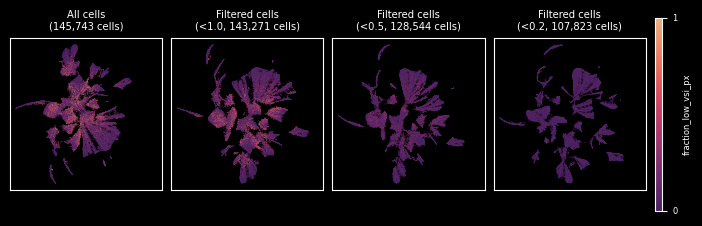
One idea is to evaluate cells based on the fraction of the area (here using pixels as proxy) that is affected by low vertical signal integrity. A reasonable threshold for the VSI may depend on your experiment.
fraction_of_low_vsi_per_cell = cell_pixels.group_by("cell_id").agg(
    fraction_low_vsi_px=(pl.col("vsi") < min_vsi).sum() / pl.col("vsi").len()
)

fraction_of_low_vsi_per_cell.head()
| cell_id | fraction_low_vsi_px |
|---|---|
| i32 | f64 |
| 115370 | 0.0390625 |
| 47595 | 0.079365 |
| 108019 | 0.0 |
| 45237 | 0.100917 |
| 61609 | 0.065574 |
Another option is to calculate the mean VSI per cell.
mean_vsi_per_cell = cell_pixels.group_by("cell_id").agg(pl.col("vsi").mean())

mean_vsi_per_cell.head()
| cell_id | vsi |
|---|---|
| i32 | f32 |
| 148927 | 0.901035 |
| 141567 | 0.894772 |
| 42608 | 0.878738 |
| 5121 | 0.829888 |
| 143684 | 0.826892 |
Filtering cells
To demonstrate the effect of low VSI cells (using these two measures) we will visualize the calculated metrics per cell in a UMAP and see what happens if we remove them.
import scanpy as sc

cells = sc.read_10x_h5(data_folder / "cell_feature_matrix.h5")

ax = sns.histplot(cells.X.sum(axis=1).A1, bins=200)
_ = ax.set(xlabel="Transcripts per cell", ylabel="No. of cells")
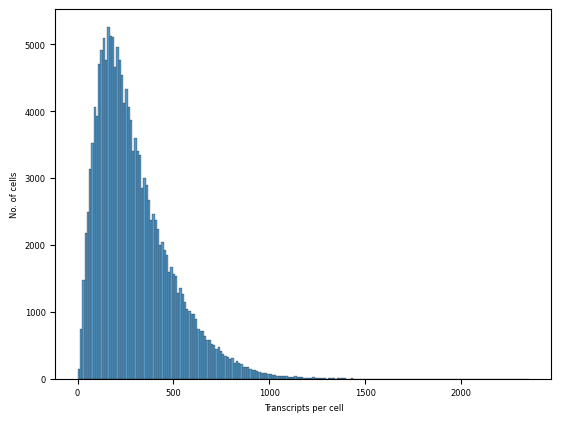
We will just perform some minimal filtering of the cells and very basic processing for the demonstration. Of course you can adjust this workflow to your liking.
sc.pp.filter_cells(cells, min_counts=50)
sc.pp.filter_cells(cells, max_counts=1_000)

sc.pp.pca(cells, n_comps=30)
sc.pp.neighbors(cells)
sc.tl.umap(cells, min_dist=0.1)
Next, we will add the calculated metrics as metadata to our cells.
# transform to pandas.DataFrame and make the index a string (necessary for AnnData)
metrics = (
    mean_vsi_per_cell.join(
        fraction_of_low_vsi_per_cell, on="cell_id", how="full", coalesce=True
    )
    .to_pandas()
    .astype({"cell_id": str})
    .set_index("cell_id")
)

# drop cells for which we do not have VSI info
cells = cells[cells.obs_names.isin(metrics.index)]

cells.obs = cells.obs.join(metrics)
And visualize the results of cell filtering in UMAPs.
Mean VSI
First a quick look at the mean VSI distribution, which can help find an appropriate threshold for filtering.
ax = sns.histplot(cells.obs["vsi"], bins=50)
_ = ax.set(xlabel="Mean VSI", ylabel="No. of cells")
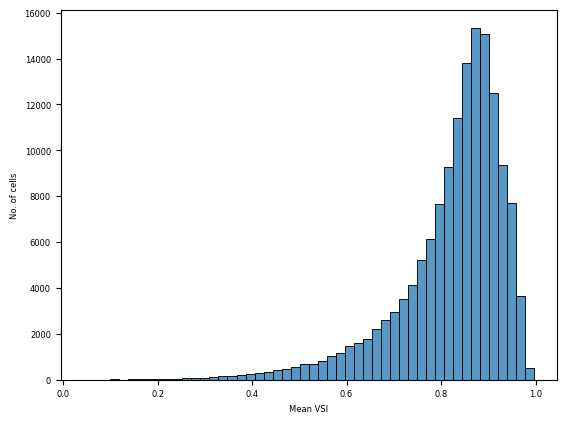
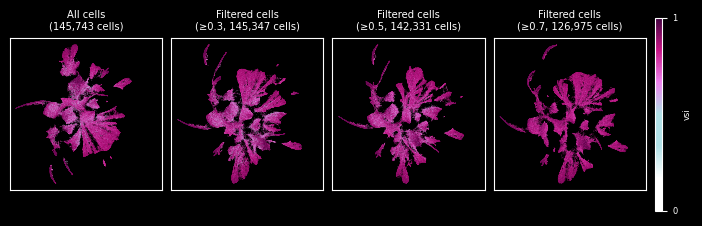
In the UMAP we can observe how the separation of clusters has improved by removing these potential doublets. We used a few thresholds to demonstrate the effect.
umap = cells.obs.copy()
umap[["UMAP1", "UMAP2"]] = cells.obsm["X_umap"]

umaps = {None: umap}

# define doublets by mean VSI below threshold and generate UMAPs w/o doublets
for t in [0.3, 0.5, 0.7]:
    umaps[f"{t:.1f}"] = calculate_umap(cells[cells.obs["vsi"] >= t].copy())


fig = plot_UMAPs(umaps, hue="vsi", threshold_label="≥{t}")
Fraction of low VSI pixels
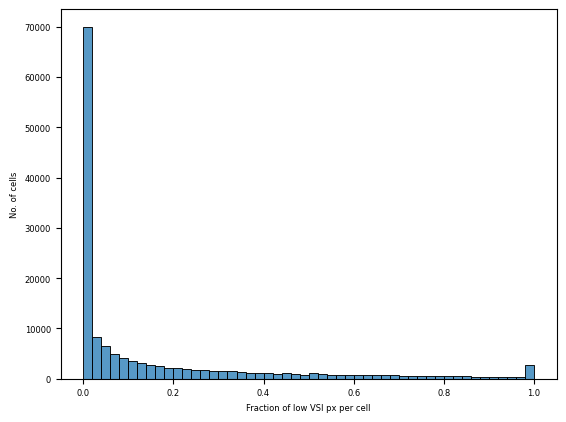
Following the same procedure as before, we first have a look at the overall distribution of our metric and then decide on a threshold for filtering and show the results in a UMAP.
ax = sns.histplot(cells.obs["fraction_low_vsi_px"], bins=50)
_ = ax.set(xlabel="Fraction of low VSI px per cell", ylabel="No. of cells")
umaps = {None: umap}

# define doublets by more than X% pixels with VSI below threshold
for t in [1, 0.5, 0.2]:
    umaps[f"{t:.1f}"] = calculate_umap(
        cells[cells.obs["fraction_low_vsi_px"] < t].copy()
    )

fig = plot_UMAPs(
    umaps, hue="fraction_low_vsi_px", threshold_label="<{t}", cmap="flare_r"
)